Public Assistance Timeline
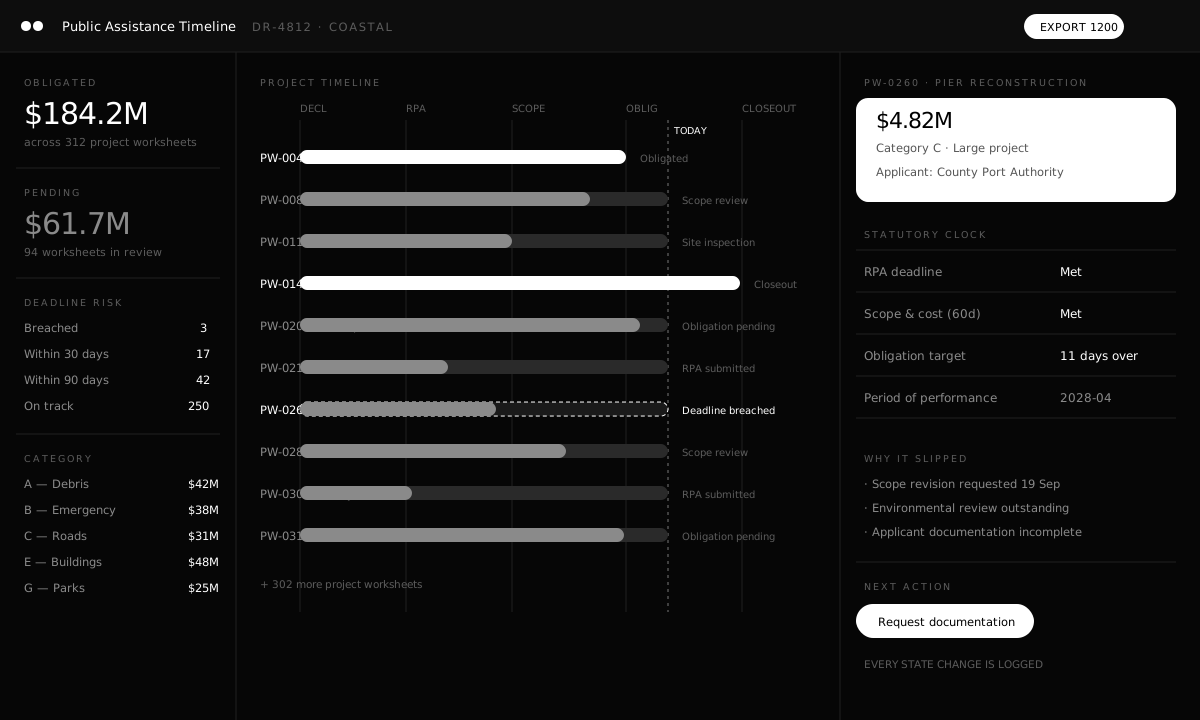
Public Assistance runs on statutory clocks. A project worksheet that slips does not announce itself; it surfaces months later as an obligation that missed its window. The timeline should make the slip visible while there is still time to act.
What it does
Declaration to closeout in one view
Every project worksheet is placed on a single timeline from declaration through RPA, scoping, obligation, and closeout.
Statutory deadlines as first-class objects
Deadlines are tracked per worksheet with breach and near-breach states, rather than inferred from a spreadsheet of dates.
Why it slipped, not just that it did
A delayed worksheet carries its reasons — scope revision, environmental review, missing applicant documentation — so the next action is obvious.
Reporting that survives review
Obligation and category reporting is produced from the same records an IG or GAO reviewer would examine.
Specification
| Area | Detail |
|---|---|
| Scope | Project worksheets across Categories A through G. |
| Timeline | Declaration, RPA, scope and cost, obligation, period of performance, closeout. |
| Deadlines | Per-worksheet statutory clocks with breach and near-breach states. |
| Reporting | Obligation totals by category and applicant, exportable. |
| Audit | Every state change recorded with actor and timestamp. |
| Security | FISMA Moderate baseline, records-grade retention. |
Tell us what's stuck.
A 30-minute briefing with the engineers who would do the work — not a sales team.